
Setting up a Secure Linux Server

No server is ever completely secure. Whenever you expose services to the public, someone will eventually try to attack them, whether through privilege escalation or denial of service. What you can do is reduce the odds that an attack succeeds, or at least limit the damage it causes.
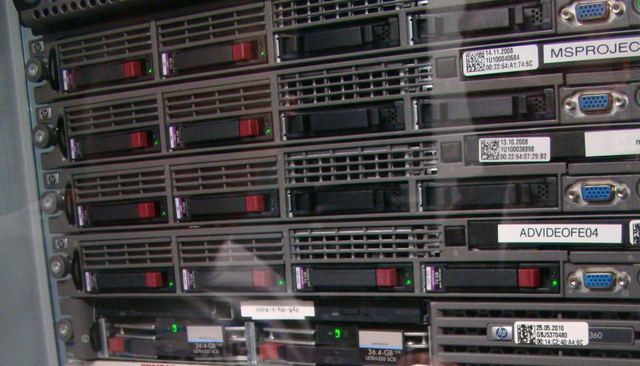
Servers in Data Center

This article doesn’t cover advanced security techniques. It covers practical, common-sense measures that will stop most opportunistic attackers and automated bots. Let’s begin.

Read full post gblog_arrow_right

Crazy DevOps Interview Questions (2)

Note: This is the second article of the series. The others are: part 1, part 3 and part 4.

Question 1

Imagine you run these commands:

# cd /tmp
# mkdir a
# cd a
# mkdir b
# cd b
# ln /tmp/a a

What happens?

A candidate might note that this hardlink would create a circular reference. That’s right, but it’s only part of the story. How would the operating system or file system actually deal with the command?

Read full post gblog_arrow_right

A Bit of PowerShell Scripting

Almost every large deployment ends up with a stray Windows machine somewhere. Actually, that’s not quite right: plenty of organizations run on Windows exclusively. The reason is simple: most closed-source SDKs only work on Windows, so to use their features you have to build a Windows service. Luckily for anyone who loves the command line, Microsoft provides an outstanding toolset in PowerShell.

When writing PowerShell code, keep two things in mind:

Read full post gblog_arrow_right

AWSome Day Bucharest 2015

Less than a month ago, I attended an Amazon event called “AWSome Day”. It was far from boring, and it clearly reflected the company’s image: polished, sophisticated and focused on the customer.

AWSome Day 2015

The day had two parts. The first was lighter and business-oriented, while the second, after lunch, went deeper into the technical side. Still, it’s worth remembering one thing: when a product costs you nothing (or appears to), you are the product.

Read full post gblog_arrow_right

Crazy DevOps Interview Questions (1)

Note: There are three more episodes in this interview series: part 2, part 3 and part 4.

Nobody enjoys interviews. Well, maybe it depends on the day or on what side of the table you happen to be in.

If an interviewer asks you any of the questions below, then they either have read this post or had drawn on the same sources I did. Either way, you’re now a step ahead.

Read full post gblog_arrow_right

What is DevOps?

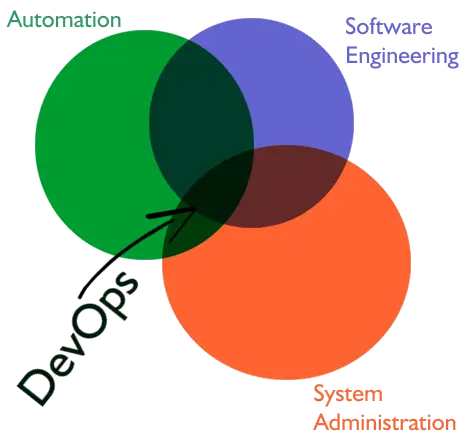
DevOps: Some people dismiss it as hype or as the sysadmin role under a new name, while others see it as just another skill you pick up from a course or a degree. It is none of these. In my view, it is a blend of skills: some come from school, some from formal training, and the rest from hands-on work day to day.

DevOps

Why isn’t it simply a renamed SysAdmin role?

  • A “classical” SysAdmin generally doesn’t rely on sophisticated automation tools. The typical routine means moving from one node to the next, applying configurations, installing software, and repairing whatever is broken.
  • A standard SysAdmin role usually involves no real programming beyond small scripts that run on individual nodes.
  • A “classical” SysAdmin typically works with physical machines, and much of the day goes to storage problems (rebuilding file systems, restoring from backups), tracking down hardware incompatibilities, and applying patches.

Why do serious, formal coding skills matter for a DevOps engineer?

The current industry trend is to describe infrastructure as Code. Today you can create whole environments (for example on AWS), complete with correctly sized hardware and pre-installed services, using nothing but Code. Automation tools like Ansible or Chef make all this possible. It takes more than basic scripting, though it doesn’t call for complex algorithms either.

Read full post gblog_arrow_right

Simple E-Mail Config with Postfix and Cyrus IMAP

This is a quick, no-frills guide to getting email running on a minimal Linux installation (Red Hat, Fedora or CentOS), such as the one you get when you launch a node in AWS from a predefined AMI (Amazon Machine Image).

Red Hat-family distributions ship with Postfix as the MTA (Mail Transport Agent) and Cyrus IMAP as the MDA (Mail Delivery Agent), so this guide focuses on those two. Once both packages are installed, the work is mostly in the configuration files.

Read full post gblog_arrow_right

Gmail-style Aliasing with Postfix

One of Gmail’s lesser-known features is plus addressing: e-mail sent to an alias of your main address, such as john.doe+22@gmail.com, is delivered to the main mailbox, john.doe@gmail.com, where it can be labeled and placed in different folders. (Note: this address is made up, and hopefully it doesn’t belong to a real person.)

How could you reproduce this on a mail server you run yourself? I won’t go into every detail, just scratch the surface. With Postfix (the default MTA on Red Hat, Fedora and CentOS), the place to start is the virtual_alias_maps option in the configuration file, main.cf.

Read full post gblog_arrow_right

Adding Swap Space to a Node

You might wonder why swap is even needed, because this isn’t enabled by default on any node in AWS or on any other cloud provider. The most likely reasons are the added complexity and the risk of wasting storage. And with instances now available with 200+ GB of RAM, why would anyone still need swap?

Swap space can be a sensible option for small nodes with 1-2 GB of memory, such as t2.micro, but because of the performance penalty, this is not suitable for production workloads. For experiments, dev testing, or QA, though, small instances are a cost-effective choice for most use cases (t2.micro is even free within certain limits during the first year).

Read full post gblog_arrow_right

Worst Mistake when Creating a RPM...

…is overlooking the order in which RPM scriptlets are executed. Ideally, you want the package to behave like this:

  • First install: register the service with chkconfig and start it.
  • Complete removal: stop the service and unregister it from chkconfig.
  • Upgrade: stop the running service, replace the binary, and start the new version, leaving the chkconfig registration untouched.

The tempting shortcut is to skip the upgrade case entirely and assume that combining the removal and installation steps will cover it. In the .spec file, that might look like this:

Read full post gblog_arrow_right